


Best CMS Systems for Web Content Management [2022]
![Best CMS Systems for Web Content Management [2022]](/images/blog/cms-sistemi/cover.jpg)
Table of Contents
What Is a CMS?
CMS (Content Management System) is a system for managing web content. It is an indispensable tool for anyone who wants to create and manage a website. A CMS system allows you to create, edit, and publish content online without in-depth technical knowledge or programming skills.
Quality CMS systems also include tools for search engine optimization (SEO), traffic analytics, and multimedia content management. There are several types of CMS systems on the market, differing in functionality, complexity of use, and intended purpose. Choosing the right CMS system is a strategic decision that can significantly impact the success of your online presence.
Which Are the Most Popular CMS Systems?
The three most popular CMS systems — WordPress, Shopify, and Wix — cover a full 75% of the market. In addition, there are other notable systems on the market, such as Drupal, Joomla, Magento (Adobe Commerce), PrestaShop, SquareSpace, HubSpot CMS Hub, and Sitecore.
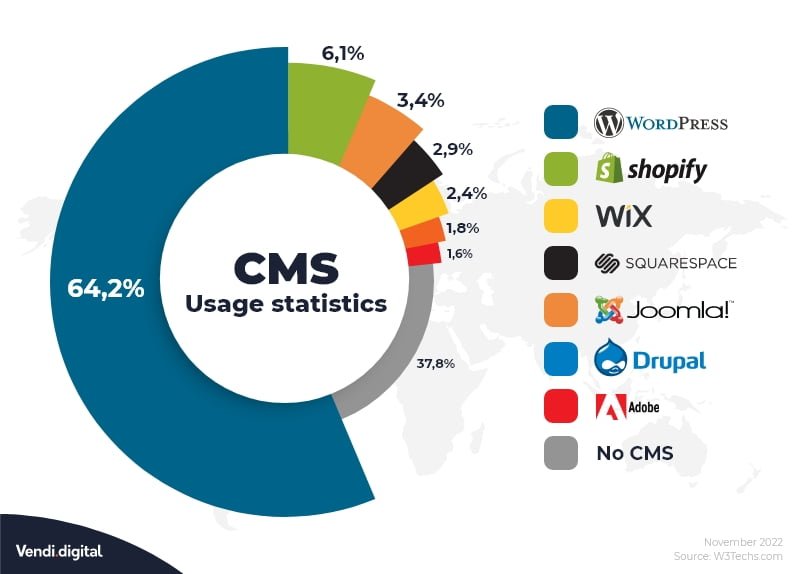
Below, we will take a closer look at each of these ten CMS systems, their advantages and disadvantages, and who they are best suited for.
1. WordPress
WordPress is by far the most popular CMS system in the world. A full 65% of all websites using a CMS are built on WordPress. It is an open-source system that is available for free and offers exceptional flexibility. WordPress is suitable for everything from simple blogs to complex websites and online stores.
Its popularity can be attributed to a large developer community, an extensive library of plugins and themes, and relative ease of use. WordPress is an excellent choice for entrepreneurs, bloggers, small and medium-sized businesses, and anyone who wants full control over their website.
Advantages
- Easy installation and quick setup
- Huge community of users and developers with active support forums
- Extensive plugin ecosystem for virtually any functionality
- Wide selection of free and premium design themes
Disadvantages
- Editing the site structure requires technical knowledge
- You need your own hosting, domain, and security management
- Not the best choice for complete beginners without a technical background
2. Shopify
Shopify is a comprehensive (all-in-one) platform specifically designed for online sales. With a simple drag-and-drop interface, it enables quick setup of an online store without technical knowledge. Shopify is an excellent choice for entrepreneurs who want to combine physical and online sales in one system.
The platform offers everything you need to start selling — from store design to inventory management and payment processing. Shopify is especially popular among small and medium-sized businesses looking for a reliable and simple e-commerce solution.
Advantages
- Support for credit and debit card payments as well as PayPal
- 24/7 customer support
- Wide selection of themes and extensions for store customization
Disadvantages
- Final costs can increase significantly with the use of third-party apps
- Fewer customization options compared to WordPress
3. Wix
Wix is a website building platform that is ideal for beginners. It offers an extremely simple interface and allows you to set up a website without any technical knowledge. Wix is also available in a free version.
Advantages
- Intuitive drag-and-drop interface
- Responsive templates that adapt to different devices
- Proprietary App Store for extending functionality
Disadvantages
- Once you choose a template, you cannot change it
- Upgrading to e-commerce is not straightforward and requires additional steps
- Exporting data from the platform is difficult
4. Drupal
Drupal is the third most popular CMS system in the world and is primarily intended for large, complex websites. It is an open-source system that offers exceptional flexibility and performance. Drupal is frequently used by government organizations, universities, and large enterprises.
Advantages
- Exceptionally high performance when handling large volumes of data
- The most customizable CMS system on the market
- Fast page loading and optimal efficiency
Disadvantages
- Requires extensive technical and programming knowledge
- Steep learning curve for new users
5. Joomla
Joomla is the second most popular CMS system and represents a compromise between the simplicity of WordPress and the power of Drupal. It is suitable for medium-sized businesses and organizations.
Advantages
- Wide selection of plugins for extending functionality
- Easy content publishing and management
- Large number of available extensions
Disadvantages
- Upgrades can be challenging and problematic
- Incompatibility between different plugins
- Weaker security compared to some competitors
- Limited capabilities for SEO optimization
6. Adobe Commerce (Magento)
Adobe Commerce, formerly known as Magento, is a CMS system for e-commerce. Owned by Adobe, it is built on an open-source foundation. It is intended for larger online stores.
Advantages
- High degree of customizability for specific business needs
- Handles large volumes of products and customers without performance loss
- Support for multiple payment options and currencies
Disadvantages
- Can be overwhelming for beginners without technical knowledge
- Magento developers are expensive and harder to find
- Limited support for the free version
7. PrestaShop
PrestaShop is an open-source CMS system designed exclusively for e-commerce. It is completely free to use.
Advantages
- Low initial costs — the platform is free to use
- Huge and active community with an extensive support forum
- No commissions or additional costs as your business grows
Disadvantages
- Can be complex to set up and manage for new users
- Many available themes do not meet high design quality standards
8. SquareSpace
SquareSpace is a website building platform ideal for beginners and individuals who value aesthetically polished design. It is especially popular among designers, photographers, artists, and creative professionals.
Advantages
- Simple drag-and-drop interface
- Hosting is included in the subscription
- Modern and aesthetically refined templates for comprehensive graphic design
Disadvantages
- Limited customization options beyond the offered templates
9. HubSpot CMS Hub
HubSpot CMS Hub is a content management system built on HubSpot’s CRM platform. It is an ideal choice for businesses that already use the HubSpot ecosystem.
Advantages
- Direct integration with the CRM system for a comprehensive customer overview
- Content personalization based on visitor behavior and characteristics
- Strong platform security and reliability
Disadvantages
- Smaller selection of plugins and themes compared to WordPress
- Less flexible for very specific or non-standard requirements
10. Sitecore
Sitecore is a CMS system designed for large enterprises and corporations. Its users include companies such as Huawei.
Advantages
- Easy editing of even very extensive websites with large amounts of content
- Insight into user behavior and A/B testing capabilities
- Advanced marketing and content personalization tools
Disadvantages
- High price that is not suitable for smaller businesses
- Documentation and support are not as developed as with WordPress
Conclusion
There is no single best CMS system — each has its own advantages and disadvantages, and the choice depends on your specific needs, technical knowledge, budget, and business goals.
Before making a decision, ask yourself the following questions:
- What is the purpose of your website?
- Do you need an online store?
- How much technical knowledge do you have available?
- What is your budget for development and maintenance?
- How quickly do you need the website?
- Do you need specific integrations with other systems?
Choosing the right CMS system will save you time, money, and frustration, allowing you to focus on what matters most — quality content and a successful business.

Marko Štrbac
Director
Marko Štrbac leads Vendi Digital d.o.o. and has over 18 years of experience in website and online store optimization and development.
LET'S START TOGETHER
Contact us
Already know what you want? Great. Have questions? Even better.
Start a project